
Illustrator Pen Tool Exercises
Get Yourself Familiar With The Pen Tool
Article written on Thursday, 09 Apr 2020
- Requirements
- Adobe Illustrator CS5
- Level
- Beginner
- Download
- Illustrator Pen Tool Exercise File
Adobe Illustrator is a fantastic vector creation tool and you can create a lot of things without ever using the Pen Tool. However, if you want to use Illustrator at its full potential, I personally believe that you need to master and become proficient in working with the aforementioned Pen tool. The inner workings of it aren't easily explained in text form so that's why I resorted to Pen Tool exercises. Remember that it is a tool that needs patience, and a lot of practice until you really master it.
The Pen Tool
When you have been using Adobe Illustrator as long as I do, you tend to forget how difficult and confusing it can be for beginners. Way back in 2007 I got inspired by a PDF document by the University of Massachusetts that is no longer available. They had one exercise that sparked the idea to create my own extended version.
How it works
You simply follow the numbers and the instructions to complete the exercise. The point you need to aim at in each step is the center of each numbered colored dot. Depending on the instructions, you either have to click, click and press, or click and press and then drag, while sometimes holding down the shift or alt/option key. The document is created in 2 layers. The bottom layer, called template contains the instructions, and is locked. The top layer is the 'working layer'. This layer is unlocked, and by default already selected. So this is the layer you'll be working on.
Once you have done these exercises several times I hope you'll understand the Pen tool and its quirks a little better.
I've used big colored dots for you to click in with the number inside. There are 3 different colors: BLUE, RED and GREEN. The BLUE ones don't require any dragging, but involve clicking, and often clicking and pressing. The RED ones, involve dragging, and sometimes a key needs to be pressed as well. The GREEN ones also involve dragging, but this time dragging one of the handles of the anchor point you've just created, while holding down a key first (alt/option). The document is more extended as it now contains 3 pages, starting with the easiest exercises first, and ending with an actual drawing of a simple tree, and a random swoosh shape.
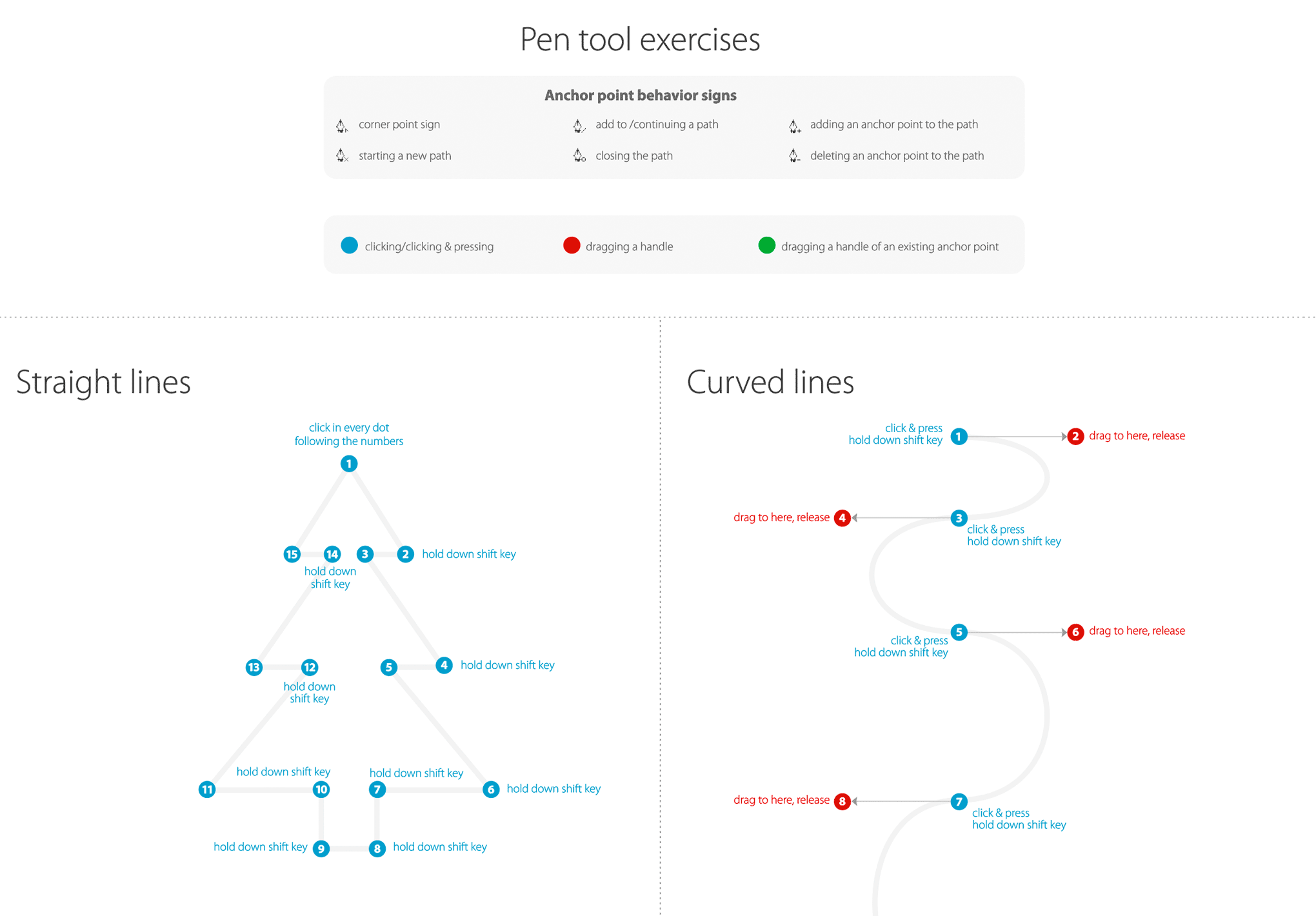
A preview of the first part of the Illustrator Pen tool exercise file
Once you have done these exercises several times I hope you'll understand the Pen tool and its quirks a little better. To be honest if you want to become proficient in Illustrator you can't live without it. The Pen tool can be used for many purposes like re-tracing a bad logo that you got from a client or creating your own art or virtually anything else you can dream up.
Photoshop's Pen Tool
When you become good at it you can use it in Adobe Photoshop too. One example could be to remove an image from its background. You draw a path around it. However, the Pen Tool doesn't work in exactly the same way. For example, you need to hold down the option/alt key for combining curves with straight lines instead of just clicking in the anchor point. Adobe should make the Pen behavior the same in all their apps, that would make things easier. Unfortunately I said that in 2007 and now 13 years later its still not fixed, so don't get your hopes up :)
Download
This document is just a starting point, but I hope it helps you to understand how the Pen tool works, and how you can get better and better in mastering this essential tool. Enjoy!